
Services
A service in BRIDGEPORT is an environment-scoped template that describes what to run (image, tag, health checks, compose template, base env). Where it actually runs is captured by one or more service deployments, each pinning the template to a specific server with its own container name, env overrides, and runtime status.
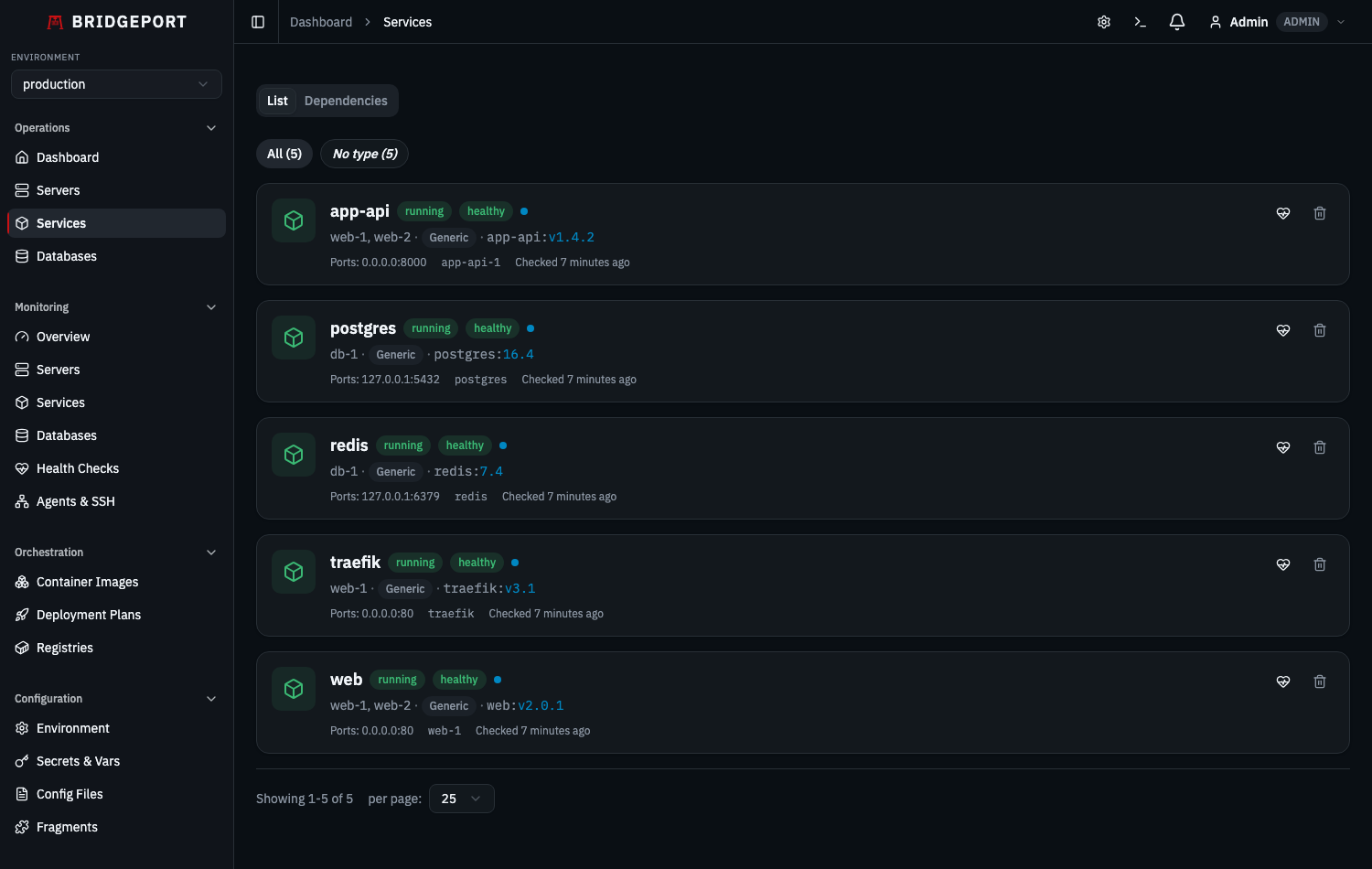
Quick Start
Section titled “Quick Start”Get a service deployed in 3 steps:
-
Discover or create a service on your server:
- Server detail page > Discover to auto-import running containers, or
- Server detail page > Create Service to set one up manually.
-
Deploy a tag:
- On the service detail page, select a tag from the dropdown and click Deploy.
-
Check health:
- Click the health check button to verify the container is running.
How It Works
Section titled “How It Works”A service has two layers:
- Service template — environment-scoped. Holds the image, tag, compose template, health checks, base env, and deploy strategy (
sequentialorparallel). One template can have many deployments. - Service deployment — one row per (template, server). Holds the container name, env overrides, runtime status (
status,containerStatus,healthStatus,discoveryStatus), exposed ports, and last-checked / last-discovered timestamps.
Every template is linked to a ContainerImage. The container image is the central entity that tracks the image name, available tags from the registry, and deployment history. One container image can be linked to many templates.
flowchart LR
    CI[ContainerImage<br>myapp:latest] --> S[Service template: app-web<br>imageTag: v2.1.0]
    S --> D1[ServiceDeployment<br>Server: web-prod-1<br>container: app-web]
    S --> D2[ServiceDeployment<br>Server: web-prod-2<br>container: app-web]
    S --> D3[ServiceDeployment<br>Server: web-prod-3<br>container: app-web]
    REG[Registry] -->|tag updates| CI

    style CI fill:#4f46e5,color:#fff
    style S fill:#0ea5e9,color:#fff
    style REG fill:#374151,color:#fff
When you deploy a tag to a service template, BRIDGEPORT:
- Looks at the template’s
deployStrategy(sequentialorparallel) and the list ofserviceDeployments. - For each deployment (one per server), creates a
Deploymentrecord (status:pending). - Generates deployment artifacts (compose file, config files) per deployment if applicable.
- Pulls the new image on each target server.
- Runs
docker compose up(if compose path is set) or restarts the container, in sequence or in parallel depending on the strategy. - Verifies each container is running.
- Records success or failure per deployment in deployment history and container image tag history.
Sequential vs parallel:
sequential(default) — one deployment at a time. Useful when downstream services depend on a hot single instance, or when you want to bail out early on the first failure.parallel— all deployments at once. Faster for stateless replicas behind a load balancer.
Step-by-Step Guide
Section titled “Step-by-Step Guide”Creating Services
Section titled “Creating Services”There are two ways to create services: auto-discovery and manual creation.
Auto-Discovery
Section titled “Auto-Discovery”Discovery scans a server’s Docker daemon and creates services for every running container. See Servers > Container Discovery for details.
Each discovered container gets:
- A service record linked to the server
- A
ContainerImagerecord (created if no matching image exists) - Current tag and container name populated from the running container
Manual Creation
Section titled “Manual Creation”Create a service template before deploying its container, or for containers that are not yet running.
Recommended (template-only) API:
POST /api/environments/:envId/servicesAuthorization: Bearer <token>Content-Type: application/json
{  "name": "app-api",  "containerImageId": "climg...",  "imageTag": "v2.1.0",  "composeTemplate": null,  "deployStrategy": "sequential"}
This creates the template only — with zero deployments. Attach servers afterwards by creating ServiceDeployment rows via the deployment endpoints.
Legacy (create template + first deployment in one call):
POST /api/servers/:serverId/servicesAuthorization: Bearer <token>Content-Type: application/json
{  "name": "app-api",  "containerName": "app-api",  "containerImageId": "climg...",  "imageTag": "v2.1.0"}
This endpoint is preserved for the CLI and pre-2.0 UI flows. It creates the env-scoped Service plus a single ServiceDeployment bound to the specified server.
Required template fields:
name— service display name (unique per environment). Free-form — rename anytime without breaking discovery.containerImageId— ID of an existingContainerImagein the same environment.
Required deployment fields (for legacy server-scoped create):
containerName— Docker container name (unique per server). Discovery matches deployments to running containers via this field, so it must match thecontainer_name:value in your compose file.
Optional fields:
imageTag— defaults tolatest.serviceTypeId— links the service to a plugin-provided Service Type (managed under/admin/service-types). Drives the grouping/filter chips on the Services list page.composeTemplate— template Compose file (the rendered file is uploaded per-deployment to each server’s compose path).deployStrategy—sequential(default) orparallel; controls how multi-server deploys roll out.baseEnv— JSON object of env vars applied to every deployment. Per-deployment env overrides take precedence.
Deploying Tags
Section titled “Deploying Tags”UI: On the service detail page, select a tag from the dropdown and click Deploy.
API:
POST /api/services/:id/deployAuthorization: Bearer <token>Content-Type: application/json
{  "imageTag": "v2.2.0",  "generateArtifacts": true,  "pullImage": true}
Parameters:
| Field | Type | Default | Description |
|---|---|---|---|
imageTag | string | Current tag | Tag to deploy |
generateArtifacts | boolean | true | Generate and upload compose/config files |
pullImage | boolean | true | Pull the image before deploying |
What happens during deploy:
- A
Deploymentrecord is created with statuspending, then updated todeploying. - BRIDGEPORT connects to the server (SSH or socket mode).
- If
generateArtifactsis true:- Creates the deploy directory (
/opt/<service-name>/or the compose path’s directory). - Generates and uploads the compose file (auto-generated or from custom template).
- Uploads attached config files to their target paths.
- Saves artifacts to the database.
- Creates the deploy directory (
- If
pullImageis true, pulls the image (docker pull <image>:<tag>). - Runs
docker compose up(compose mode) ordocker restart(direct mode). - Verifies the container is running.
- Appends container output (
docker logs <container>, lastdefaultLogLineslines with timestamps) to the deployment log. This runs on both the success and failure paths so a container that crashes immediately surfaces its internal error in the deployment plan view without needing SSH access. If the container does not exist (for example,docker compose upfailed before creating it), a--- container logs unavailable: <reason> ---note is appended instead. - Updates the deployment record to
successorfailedwith logs and duration.
Response:
{ "deployment": { "id": "cldep...", "imageTag": "v2.2.0", "previousTag": "v2.1.0", "status": "success", "logs": "[2026-02-25T10:00:00Z] Starting deployment...\n...", "durationMs": 12340, "startedAt": "2026-02-25T10:00:00.000Z", "completedAt": "2026-02-25T10:00:12.340Z" }, "logs": "...", "previousTag": "v2.1.0"}Dry-Run Preview
Section titled “Dry-Run Preview”Add ?dryRun=true to the query string (or send X-Dry-Run: true as a header) on POST /api/services/:id/deployments/:depId/deploy to preview what a real deploy would do without creating a Deployment row, pulling the image, opening an SSH write session, or running docker compose up. The same flag works on POST /api/services/:id/sync-files and the deployment-plan / config-file sync endpoints documented below.
POST /api/services/:id/deployments/:depId/deploy?dryRun=trueAuthorization: Bearer <token>Response shape:
{ "dryRun": true, "serviceId": "csrv...", "serviceDeploymentId": "csdp...", "serverName": "web-1", "imageTag": "v2.2.0", "imageDigest": "sha256:abc123...", "composeContent": "services:\n api:\n image: registry.example.com/api:v2.2.0\n ...", "env": { "PORT": "3000", "DB_PASSWORD": "***" }, "containerAction": "cycle", "warnings": []}imageDigestis resolved from the registry manifest (nodocker pull).nullwhen no registry connection exists or the manifest fetch failed — a warning is added explaining why.containerActionis"start"(no container running),"cycle"(running, would be recreated bycompose up), or"no-op".- Secret VALUES are replaced with
***in bothcomposeContentandenv.${KEY}references in the template stay visible in the source compose template’s substitution path; once resolved, the substituted value is redacted. - The endpoint still writes an audit-log entry with
details.dryRun = trueso operators can see who probed which deployment. - The request body’s
imageTag(if provided) is honored — the preview reflects the tag that the real deploy would have used. Plan dry-runs use the per-steptargetTagthe same way. - When the real deploy would have failed at artifact generation (missing secrets, template errors in a config file), the response carries
"wouldSucceed": falseand an"error"string describing the blocker. The preview is still returned (so operators can see what is broken) but callers should treat this as a hard block before running the real path.
For the service-wide POST /api/services/:id/sync-files endpoint, the dry-run response shape is:
{ "dryRun": true, "results": [ { "serverName": "web-1", "serviceName": "api", "configFileName": "app.env", "hostPath": "/etc/api/app.env", "diff": "--- a/etc/api/app.env\n+++ b/etc/api/app.env\n@@ -1,2 +1,2 @@\n-OLD=value\n+NEW=value", "exists": true, "referencingServices": ["api"], "warnings": [] } ]}Drift Detection
Section titled “Drift Detection”Drift endpoints diff BRIDGEPORT’s stored view of a service against the actual state on the host. They are strictly read-only — they only run docker inspect and file reads (cat) and never pull images, write files, or touch containers. All three are viewer-accessible.
GET /api/services/:id/drift # one service, all its deploymentsGET /api/servers/:id/drift # every deployment on a serverGET /api/environments/:envId/drift # environment-wide roll-upAuthorization: Bearer <token>A service can be deployed to multiple servers (one ServiceDeployment per server), and runtime state lives on the deployment — so drift is reported per deployment, keyed by serverId.
Response shape (GET /api/services/:id/drift):
{ "serviceId": "csrv...", "serviceName": "api", "checkedAt": "2026-06-08T12:00:00.000Z", "deployments": [ { "serviceDeploymentId": "csdp...", "serverId": "csvr...", "serverName": "web-1", "containerName": "api", "drift": { "composePath": { "expected": "/opt/api/docker-compose.yml", "actual": "/opt/api/docker-compose.yml", "match": true }, "composeContent": { "match": false, "reason": "Host compose file content differs from the regenerated compose." }, "imageDigest": { "expected": "sha256:abc...", "actual": "sha256:def...", "match": false, "reason": "Host image digest does not match the recorded deployed digest." }, "exposedPorts": { "expected": [{ "host": 80, "container": 80, "protocol": "tcp" }], "actual": [{ "host": null, "container": 80, "protocol": "tcp" }], "match": false, "reason": "Published ports differ from the stored mapping." }, "configFiles": [ { "targetPath": "/etc/api/app.env", "configFileName": "app.env", "match": true } ], "envVars": { "missing": [], "unexpected": ["LOG_LEVEL"], "match": false } }, "summary": "3 drift items detected", "warnings": [] } ], "summary": "3 drift items detected"}GET /api/servers/:id/drift returns the same per-deployment shape under deployments (one entry per deployment on the server). GET /api/environments/:envId/drift groups deployments under a services[] array ({ serviceId, serviceName, deployments[] }).
Per-field semantics:
matchistrue(in sync),false(drift detected), ornull(could not be reliably compared — seereason). Thesummarycounts onlymatch: falsefields;nullis never counted as drift.composePath— the stored deployment compose path is the source of truth.match: nullwhen no path is set (auto-managed compose off, or never deployed via compose).composeContent— compared by checksum only; the raw content is never returned because it can embed secrets.match: nullwith a reason when the compose file is shared and operator-maintained (BRIDGEPORT intentionally does not rewrite those, so content drift is expected).imageDigest—expectedis the manifest digest BRIDGEPORT recorded as deployed;actualis read from the host image’sRepoDigests.match: null(not a false mismatch) when the comparison can’t be resolved — e.g. the host image is locally built / never pulled by digest, or BRIDGEPORT has no recorded deployed digest.exposedPorts— compared as a set ofhost:container/protocolmappings, derived from the same logic a real deploy uses to publish ports.configFiles— one entry per attached config file, compared by checksum only over secret-redacted content. Binary files reportmatch: nullwith a reason.envVars— only keys BRIDGEPORT manages (baseEnv+ per-deploymentenvOverrides) are compared; image-baked and Docker-injected vars (PATH,HOSTNAME, …) are ignored.missing= a managed key absent on the host container;unexpected= a managed key whose host value differs. Only key names are returned, never values — so secret values never leak.
Security: drift never returns decrypted secret values or raw secret-bearing content. Content comparisons hash secret-redacted text, and env comparisons report presence/mismatch by key name only. Hosts that are unreachable degrade each affected field to match: null with a reason/warnings entry rather than failing the whole request.
Deployment Logs & History
Section titled “Deployment Logs & History”View deployment history:
GET /api/services/:id/deployments-history?limit=20Authorization: Bearer <token>Returns recent deployments ordered newest first, each with id, imageTag, previousTag, status, triggeredBy, startedAt, completedAt, durationMs, and serviceDeployment.server ({ id, name }, nullable for legacy rows whose per-server deployment is gone).
View a single deployment with logs:
GET /api/deployments/:idAuthorization: Bearer <token>View deployment artifacts:
GET /api/deployments/:id/artifactsAuthorization: Bearer <token>Returns the compose file, env files, and config files that were generated and uploaded during that deployment.
View service action history (all actions):
GET /api/services/:id/history?limit=50Authorization: Bearer <token>Returns audit log entries for this service (deploys, restarts, health checks, updates, creates) plus a separate deployments array.
Service Actions
Section titled “Service Actions”BRIDGEPORT supports several container lifecycle actions:
Restart container:
POST /api/services/:id/restartAuthorization: Bearer <token>For compose-managed services (those with a composePath), restart runs docker compose ... rm -f -s <service> followed by docker compose ... up -d --force-recreate <service>. This creates a new container so updated compose or config files are picked up. For services without a composePath, restart falls back to docker restart <container-name>. Restart does not regenerate compose artifacts — it always uses the current on-disk compose file. The action is logged in the audit trail.
View container logs:
GET /api/services/:id/logs?tail=100&before=2026-05-25T10:23:45ZAuthorization: Bearer <token>Returns container logs with timestamps. Query params:
tail(optional): number of lines to return. When omitted, falls back to thedefaultLogLinessystem setting.before(optional): ISO-8601 timestamp. When set, the endpoint returns up totaillines whose timestamps are at or before this value — used by the service detail logs viewer to page back (“Load older”).
Output always includes Docker timestamps (docker logs -t), so the client can extract the oldest line’s timestamp and request the next page with before=<that timestamp>.
Stream container logs (SSE):
GET /api/services/:id/logs/streamAuthorization: Bearer <token>Opens a Server-Sent Events stream with real-time stdout and stderr events.
Run predefined commands:
POST /api/services/:id/run-commandAuthorization: Bearer <token>Content-Type: application/json
{  "commandName": "shell"}
Runs a command defined by the service’s service type (e.g., Django shell, Node.js REPL). Returns the command string for the CLI to execute.
Check for image updates:
POST /api/services/:id/check-updatesAuthorization: Bearer <token>Queries the linked registry for newer tags and returns whether an update is available.
Health Check Configuration
Section titled “Health Check Configuration”Each service has per-service health check settings used during deployment orchestration:
| Setting | API Field | Default | Description |
|---|---|---|---|
| Health Wait | healthWaitMs | 30000 (30s) | Wait after deploy before first check |
| Health Retries | healthRetries | 3 | Number of check attempts |
| Health Interval | healthIntervalMs | 5000 (5s) | Time between retry attempts |
Update health check config:
PATCH /api/services/:idAuthorization: Bearer <token>Content-Type: application/json
{  "healthWaitMs": 60000,  "healthRetries": 5,  "healthIntervalMs": 10000}
Manual health check:
POST /api/services/:id/healthAuthorization: Bearer <token>This runs a comprehensive check:
- Connects to the server and inspects the container (state, health, ports, image).
- If
healthCheckUrlis configured, makes an HTTP request to that URL. - Updates the service’s
status,containerStatus, andhealthStatusfields. - Checks the linked registry for available updates.
- Logs the result in the health check log.
Set a health check URL:
PATCH /api/services/:idAuthorization: Bearer <token>Content-Type: application/json
{ "healthCheckUrl": "http://localhost:8000/health"}TCP & Certificate Checks
Section titled “TCP & Certificate Checks”For services that expose TCP ports or TLS endpoints, the monitoring agent can perform automated connectivity and certificate expiry checks.
Configure TCP checks:
PATCH /api/services/:idAuthorization: Bearer <token>Content-Type: application/json
{  "tcpChecks": "[{\"host\": \"localhost\", \"port\": 5432, \"name\": \"postgres\"}]"}
Configure certificate checks:
PATCH /api/services/:idAuthorization: Bearer <token>Content-Type: application/json
{  "certChecks": "[{\"host\": \"api.example.com\", \"port\": 443, \"name\": \"api-cert\"}]"}
The agent runs these checks periodically and stores results in agentTcpCheckResults and agentCertCheckResults on the service record.
Service Types (Grouping & Filtering)
Section titled “Service Types (Grouping & Filtering)”Each service can be linked to a Service Type via serviceTypeId. Service Types are plugin-provided (and admin-editable under /admin/service-types); they carry a display name and an optional set of predefined commands. The Services list page groups and filters by the linked Service Type.
Set / change a service’s type:
PATCH /api/services/:idAuthorization: Bearer <token>Content-Type: application/json
{  "serviceTypeId": "<service-type-id>"}
Pass null to clear it (the service becomes “untyped”).
List the service types in use in an environment (for the filter chips):
GET /api/environments/:envId/services/type-countsAuthorization: Bearer <token>Response:
{ "types": [ { "id": "ckxq...", "displayName": "Django", "count": 4 }, { "id": "ckyr...", "displayName": "Postgres", "count": 2 } ]}Services with no serviceTypeId are excluded — the Services list page surfaces untyped services via a separate “No type” filter chip.
UI: the Services list page shows filter chips at the top (one per Service Type in use, plus “No type” when applicable). The selected chip persists in the URL via ?type=<serviceTypeId> (?type=__none__ for the “No type” chip). The ServiceDetail config modal exposes a “Service Type” dropdown.
Linking to Container Images
Section titled “Linking to Container Images”Every service is linked to a ContainerImage — the central entity that tracks the Docker image name, deployed tags, and registry updates.
Change a service’s container image:
PATCH /api/services/:idAuthorization: Bearer <token>Content-Type: application/json
{  "containerImageId": "clnewimg..."}
The container image must be in the same environment as the service’s server. One image can be linked to many services, enabling “deploy all” workflows from the Container Images page.
See Container Images for managing images, tag history, and auto-updates.
Service Dependencies
Section titled “Service Dependencies”Dependencies define the order in which services should be deployed and health-checked during orchestrated deployments.
Two dependency types:
| Type | Meaning |
|---|---|
health_before | The dependency must be healthy before this service is deployed |
deploy_after | This service deploys after the dependency has been deployed |
Dependencies are configured on the service detail page or via the Service Dependencies API. They are used by deployment plans to build the correct execution order.
See Deployment Plans for the full orchestration guide.
Config File Attachment & Sync
Section titled “Config File Attachment & Sync”Config files (docker-compose overrides, nginx configs, .env files, certificates) can be attached to services and synced to the server during deployment.
Attach a config file to a service:
POST /api/services/:serviceId/filesAuthorization: Bearer <token>Content-Type: application/json
{  "configFileId": "clcfg...",  "targetPath": "/opt/app-api/config/nginx.conf"}
The targetPath is the absolute path on the server where the file will be written during deployment. During deploy, BRIDGEPORT:
- Resolves any
{{SECRET_NAME}}placeholders in the file content with actual secret values. - Uploads the file to the target path via SSH.
- Sets
chmod 600on.envfiles for security.
See Config Files for creating and managing config files.
Docker Compose Templates
Section titled “Docker Compose Templates”BRIDGEPORT generates a Docker Compose file for each service during deployment. You can use the auto-generated default or provide a custom template.
Auto-Generated Template
Section titled “Auto-Generated Template”If no custom template is set, BRIDGEPORT generates a minimal compose file:
services: app-api: image: "registry.example.com/app-api:v2.1.0" container_name: app-api restart: unless-stopped volumes: - "/opt/app-api/config/nginx.conf:/opt/app-api/config/nginx.conf:ro" ports: - "8080:80"The auto-generated template includes the image, container name, restart policy, read-only volume mounts for any attached config files, and ports: entries derived from the service’s discovered exposedPorts.
Port-mapping behavior:
- An explicit binding (e.g.,
8080:80) round-trips as"8080:80". - A binding restricted to a specific host IP (e.g.,
127.0.0.1:8080:80) preserves the IP, so loopback-only services are not silently widened to all interfaces on regenerate. - A port the container only
EXPOSEs (no host binding) is published on the matching host port —EXPOSE 80becomes"80:80". Without this, the regenerated compose would have noports:section and the container would come up unreachable.
To opt out of a port binding entirely (e.g., a service that should only be reached from inside the docker network), switch to a custom template.
Custom Templates
Section titled “Custom Templates”For complex setups (extra networks, sidecar containers, environment variables, volume mounts), create a custom compose template with variable substitution.
Set a custom template:
PUT /api/services/:id/compose/templateAuthorization: Bearer <token>Content-Type: application/json
{  "composeTemplate": "services:\n  ${SERVICE_NAME}:\n    image: ${FULL_IMAGE}\n    container_name: ${CONTAINER_NAME}\n    restart: unless-stopped\n    networks:\n      - traefik\n    volumes:\n      - ${CONFIG_FILE_0}:${CONFIG_FILE_0}:ro\n      - app-data:/data\n\nvolumes:\n  app-data:\n\nnetworks:\n  traefik:\n    external: true"}
Variable Substitution
Section titled “Variable Substitution”Custom templates support these variables:
| Variable | Replaced With | Example |
|---|---|---|
${SERVICE_NAME} | Service name | app-api |
${CONTAINER_NAME} | Docker container name | app-api |
${IMAGE_NAME} | Full image path without tag | registry.example.com/app-api |
${IMAGE_TAG} | Tag being deployed | v2.1.0 |
${FULL_IMAGE} | Image path with tag | registry.example.com/app-api:v2.1.0 |
${CONFIG_FILE_N} | Mount path of Nth config file (0-indexed) | /opt/app-api/config/nginx.conf |
${CONFIG_FILE_N_NAME} | Filename of Nth config file (0-indexed) | nginx.conf |
Preview Before Deploying
Section titled “Preview Before Deploying”Preview what the generated artifacts will look like without actually deploying:
GET /api/services/:id/compose/previewAuthorization: Bearer <token>Returns the compose file content, config file contents (with secret placeholders resolved), and checksums.
View Past Deployment Artifacts
Section titled “View Past Deployment Artifacts”GET /api/deployments/:id/artifactsAuthorization: Bearer <token>Returns all artifacts (compose, config, env files) that were generated and uploaded during a specific deployment.
Revert to Auto-Generated
Section titled “Revert to Auto-Generated”Delete the custom template to go back to the auto-generated default:
DELETE /api/services/:id/compose/templateAuthorization: Bearer <token>When to Use Custom Templates
Section titled “When to Use Custom Templates”| Scenario | Recommendation |
|---|---|
| Simple single-container service | Auto-generated is sufficient |
| Extra Docker networks (e.g., Traefik) | Custom template |
| Named volumes or bind mounts | Custom template |
| Sidecar containers | Custom template |
| Environment variables in compose | Custom template |
| Complex restart/healthcheck policies | Custom template |
Configuration Options
Section titled “Configuration Options”Service Template Settings (env-scoped, shared across deployments)
Section titled “Service Template Settings (env-scoped, shared across deployments)”| Field | Type | Default | Description |
|---|---|---|---|
imageTag | string | 'latest' | Tag deployed across all deployments of this template |
composeTemplate | string | null | Custom compose template (null = auto-generated) |
baseEnv | JSON string | null | Env vars applied to every deployment (overrides win per-deployment) |
deployStrategy | enum | 'sequential' | sequential or parallel — how multi-server deploys roll out |
healthCheckUrl | string | null | URL to check for HTTP health |
healthWaitMs | int | 30000 | Wait after deploy before checking health |
healthRetries | int | 3 | Number of health check attempts |
healthIntervalMs | int | 5000 | Interval between health check retries |
serviceTypeId | string | null | Plugin-provided Service Type (predefined commands). Also drives the grouping/filter chips on the Services list. |
tcpChecks | JSON string | null | TCP port checks (agent-required) |
certChecks | JSON string | null | TLS certificate checks (agent-required) |
Service Deployment Settings (per-server)
Section titled “Service Deployment Settings (per-server)”| Field | Type | Default | Description |
|---|---|---|---|
serverId | string | required | Target server for this deployment |
containerName | string | required | Docker container name on the server (unique per server) |
composePath | string | null | Path to compose file on the server |
envOverrides | JSON string | null | Per-deployment env vars (override the template baseEnv) |
exposedPorts | JSON string | null | Discovered exposed ports (managed by discovery) |
status / containerStatus / healthStatus | string | derived | Per-deployment runtime status, updated by health checks and the agent |
discoveryStatus | string | 'unknown' | found / missing / unknown — last discovery result |
lastCheckedAt / lastDiscoveredAt / lastDeployedAt | datetime | null | Per-deployment timestamps |
Environment-Level Settings (Affect All Services)
Section titled “Environment-Level Settings (Affect All Services)”| Setting | Module | Default | Description |
|---|---|---|---|
| Service Health Interval | Monitoring | 60000ms | Automated health check frequency |
| Update Check Interval | Monitoring | 1800000ms | How often to check registries for new tags |
Troubleshooting
Section titled “Troubleshooting”Deploy fails with “Container is not running after deploy”
The container exited after starting. Check container logs (GET /api/services/:id/logs) for error messages. Common causes: missing environment variables, port conflicts, or application errors.
“Service not found” on deploy Verify the service ID is correct. If the service was recently deleted and re-created, the ID will have changed.
“Container image must be in the same environment”
When creating a service, the containerImageId must reference a container image in the same environment as the server. Create the image in the correct environment first.
Health check returns “unknown” status The container was not found on the server. Run container discovery to update the service’s status, or verify the container name matches what is actually running.
Config files not appearing on the server after deploy
- Verify the config file is attached to the service with a target path.
- Check that
generateArtifactsistrue(the default) in the deploy request. - Verify SSH connectivity to the server.
Custom compose template variables not substituted
Variable syntax is ${VARIABLE_NAME} (with curly braces). Check for typos in variable names. Only the variables listed in the Variable Substitution table are supported.
“No registry connection configured” when checking for updates The service’s container image is not linked to a registry connection. Configure one on the Container Images page.
Related
Section titled “Related”- Servers — managing the machines services run on
- Container Images — central image management and tag history
- Deployment Plans — orchestrated multi-service deployments with dependencies
- Config Files — managing configuration files
- Secrets — encrypted secrets used in config file templates
- Health Checks — health check types and scheduling
- Environment Settings Reference — monitoring intervals